“Zero Trust” is a simple idea that solves a very ordinary problem: your antivirus can only stop threats it recognises. Zero Trust flips the approach so that unknown threats are stopped too. This is application allow-listing and here’s what it means for your business…
The idea in one sentence
Block everything by default, then allow only what’s needed.
That’s it. Instead of letting all software run and trying to spot the bad stuff, a Zero Trust approach only lets software run if it’s known to be safe.
Why antivirus alone misses new threats
Traditional antivirus works from a library of known threats – it recognises malware it has seen before. The trouble is that new malware is created constantly, deliberately designed to look harmless and evade recognition. A brand-new threat has never been seen before, so by definition, the antivirus has no entry for it.
Most ransomware attacks now use exactly these novel techniques. Waiting for the security industry to catalogue each new threat is a losing race.
A straightforward example:
Imagine a member of staff receives an email with an invoice attached, along with a convincing message about an overdue account. They download and open the “invoice tool” it comes with.
Without Zero Trust, that’s a coin flip: if the malware is new, the antivirus may wave it straight through, and the infection begins.
With a Zero Trust approach using ThreatLocker, the fake invoice tool simply can’t run. It isn’t on the list of approved software, so Windows refuses to execute it. The staff member sees an error, reports it, and the attack ends before it started.
“Won’t it slow my team down?”
This is the most common worry, and it’s a fair one, but in practice approved software runs exactly as normal. Your team’s everyday applications, from Microsoft 365 to their line-of-business tools, are on the allow list and launch without a second thought. The only thing that changes is what happens to unapproved software: it doesn’t run.
And when something new is needed? An approved request gets software allowed quickly, often within minutes. Someone who genuinely needs a new tool gets it; someone who’s just downloaded something dubious doesn’t.
How Disking IT deploys ThreatLocker
We use ThreatLocker, a leading Zero Trust platform, to bring this approach to businesses of any size.
Our managed ThreatLocker solutions are built in layers, so you can start with prevention and add detection and response as your business and risk profile grow.
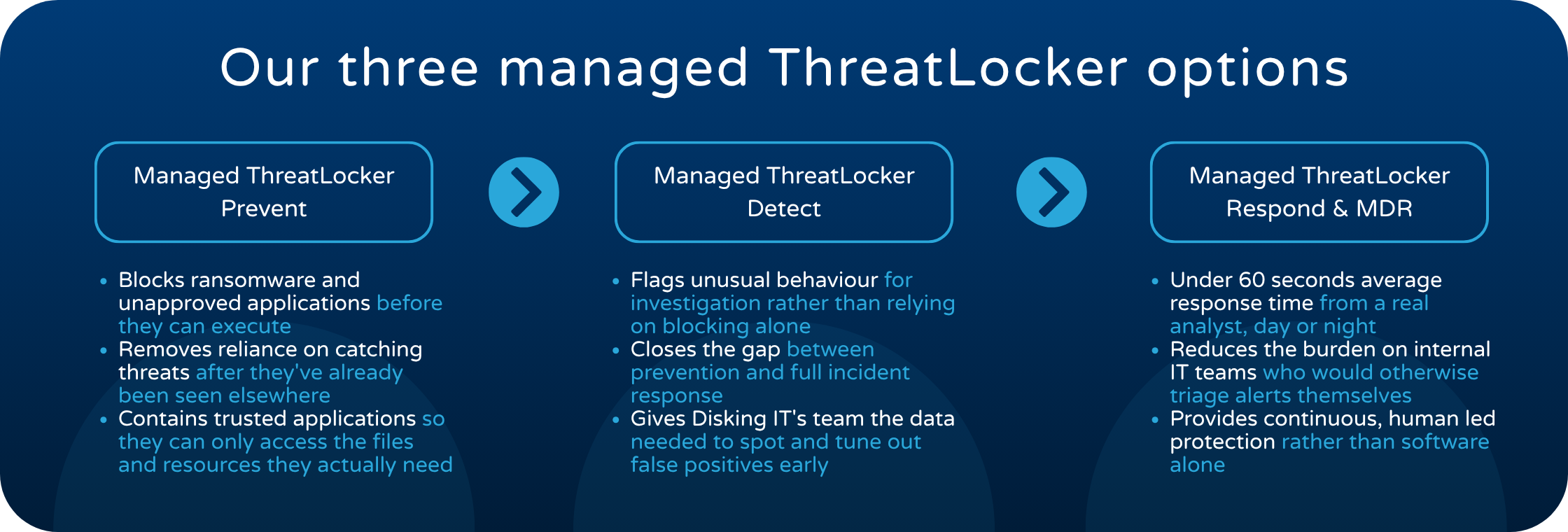
Managed ThreatLocker Prevent:
Managed ThreatLocker Detect:
Managed ThreatLocker Respond & MDR:

FAQs
What is Zero Trust?
A security approach based on “never trust, always verify”: nothing is allowed to run or connect unless it’s been explicitly approved. It’s the opposite of the traditional model, where everything is allowed unless recognised as bad.
Is antivirus still enough?
Antivirus remains a useful layer, but it can only stop threats it recognises. New malware is designed to evade it. Zero Trust complements antivirus by blocking anything unapproved, known or not.
Will Zero Trust slow my team down?
Approved software runs exactly as before. The only change is that unapproved software doesn’t run, and legitimate new software can be approved quickly. Most users notice nothing.
Is it too complex for a small business?
Not when it’s managed for you. ThreatLocker deployments are handled end to end by our team, and businesses of 10 or 200 staff get the same protection model that enterprises use, without needing in-house expertise.
Want to see it working?
Visit our ThreatLocker page to learn more, or get in touch for a straightforward chat about whether Zero Trust is right for your business.