Microsoft Is Retiring SMS and Call-Based MFA. Here’s How to Stay Ahead of It
If your business relies on text messages or automated phone calls for multi factor authentication (MFA) in Microsoft 365, change is coming, whether you plan for it or not. Microsoft has confirmed it is retiring its own SMS and voice call based MFA from Entra ID, in favour of phishing-resistant alternatives like passkeys.
This isn’t a minor tweak. It’s a direct response to how attackers are exploiting SMS and voice MFA today, including SIM-swap fraud, call interception, and increasingly convincing AI-driven phishing campaigns. For UK businesses, the sooner you plan your move, the less disruptive it will be.
Here’s what’s changing, why it matters, and how Disking IT can help your business make the switch smoothly.

What Microsoft Is Changing, and When
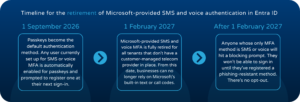
Microsoft has set out a clear timeline for the retirement of Microsoft-provided SMS and voice authentication in Entra ID:
- 1 September 2026 – Passkeys become the default authentication method. Any user currently set up for SMS or voice MFA is automatically enabled for passkeys and prompted to register one at their next sign-in.
- 1 February 2027 – Microsoft-provided SMS and voice MFA is fully retired for all tenants that don’t have a customer-managed telecom provider in place. From this date, businesses can no longer rely on Microsoft’s built-in text or call codes.
- After 1 February 2027 – Anyone whose only MFA method is SMS or voice will hit a blocking prompt. They won’t be able to sign in until they’ve registered a phishing-resistant method. There’s no opt-out.
Businesses can request a short delay to the automatic passkey enrolment while they prepare, but the 1 February 2027 cut-off itself cannot be avoided. If you haven’t started planning yet, now is the time.
Why Microsoft Is Doing This
SMS and voice codes have always been better than no MFA at all, but they were never as secure as most businesses assumed. The codes are sent in plain text over mobile networks, which makes them vulnerable to:
- SIM-swap attacks, where a criminal convinces a mobile network to move your number to their SIM
- Interception, exploiting known weaknesses in mobile signalling networks
- Real-time phishing, where a fake login page captures your code the moment you type it in and relays it to the attacker
Microsoft has been explicit that this move is about closing the door on phishing, particularly as AI tools make phishing campaigns faster to produce and harder to spot. Passkeys, security keys, and certificate-based sign-in don’t rely on a shareable code, which means there’s nothing for an attacker to trick a user into handing over.
What This Means for Your Business
Even if this feels like a “Microsoft problem” for now, it has practical implications for your business:
User disruption. If you don’t plan ahead, staff could hit blocking sign-in prompts at an inconvenient moment, for example during a client call or on the road, with no way to bypass them until they register a new method.
Insurance and compliance. Many cyber insurance policies already ask specific questions about the type of MFA in place, not just whether MFA exists. As phishing-resistant MFA becomes the recognised standard, insurers are likely to expect it. If you hold cyber insurance through us and New Dawn Risk, this is worth raising as part of your renewal conversation, and it’s exactly the kind of gap our free security audit is designed to catch.
A chance to raise the bar, not just tick a box. Rather than treating this as a forced migration, it’s a good opportunity to review your wider identity security, including who has admin access, whether legacy authentication protocols are still enabled, and how conditional access policies are configured.
Future-Proof MFA Alternatives Worth Moving To
Microsoft’s own guidance points businesses towards these phishing-resistant methods:
- Passkeys – the recommended default going forward. These can be synced across a user’s devices (via iCloud Keychain or Google Password Manager, for example) or bound to a single device for extra security.
- Microsoft Authenticator app – already a stronger option than SMS, and a sensible interim step for businesses not yet ready for passkeys.
- Windows Hello for Business – uses biometrics or a PIN tied to a specific device, ideal for company-owned laptops.
- FIDO2 security keys – physical hardware keys, well suited to admins, finance teams, or anyone handling particularly sensitive systems.
The right mix depends on your business, your devices, and how your teams work day to day. A one-size-fits-all rollout rarely lands well, which is why planning matters as much as the technology itself.
How Disking IT Can Help
We’ve supported businesses through more than one Microsoft-driven change over the years, and this is exactly the kind of transition we like to get ahead of rather than react to. We can help you:
- Identify exactly which users and systems in your Microsoft 365 tenant are still relying on SMS or voice MFA
- Build a migration plan that rolls out passkeys or security keys with minimal disruption to your team
- Update your conditional access and authentication policies so the change actually improves your security posture, not just ticks a compliance box
- Train staff on how to register and use their new authentication method with confidence
- Review whether your current setup meets the requirements your cyber insurer expects, as part of our free security audit
If you’d like to know exactly where your business stands, get in touch and we’ll walk you through it, no jargon and no obligation.